Best Practices for Designing Engaging Web Carousels
Key Takeaways
- Use carousels judiciously to enhance user experience without overwhelming visitors.
- Ensure carousels are accessible and user-friendly across all devices.
- Prioritize content relevance and clarity in each slide.
Table of Contents
- Introduction
- When to Use Carousels
- Design Best Practices
- Accessibility Considerations
- Performance Optimization
- Testing and User Feedback
- Conclusion
Web carousels, or sliders, are a strategic design element that allows designers to display multiple pieces of content within a compact space. When done well, they can drive engagement while enhancing a user’s overall experience. However, poor design decisions can result in frustration, reduced interaction, and accessibility barriers. This article provides a practical guide to carousel UI design with essential best practices for engaging users and improving overall site effectiveness. Choosing a carousel means balancing aesthetics, UX best practices, and inclusivity. It is important to understand when a carousel adds value and when to avoid it. Modern carousels are much more than rotating banners; they’re tools that help prioritize and communicate critical content. With meticulous attention to design details, carousels can support both business goals and user needs. Although carousels are common on homepages for product highlights or promotional banners, their performance depends on purposeful implementation. Overusing carousels or cramming too much information into a single slider can have the opposite effect, decreasing engagement rather than increasing it. The following guide outlines best practices for integrating a carousel component into a website’s user interface.
Introduction
Carousels appear in many web interfaces as an efficient way to rotate through featured products, articles, or announcements. Their visual appeal and space-saving ability make them a staple on e-commerce homepages and news portals alike. But like any facet of UX design, their true effectiveness is in their execution. A well-crafted carousel supports user journeys, while a poorly designed one detracts from the site’s goals and usability. When designed with clear navigation, fast loading times, and accessible controls, carousels can improve engagement, highlight priority content, and encourage users to explore more without overwhelming the page layout.
When to Use Carousels
Strategically integrated carousels serve specific purposes. They are most effective in scenarios where displaying a variety of items or messages in a limited space improves the overall value of the site. For example, e-commerce platforms use carousels to showcase new arrivals, trending categories, or time-sensitive deals without overcrowding the homepage.
- Showcase a range of products or services without creating a crowded layout.
- Feature multiple promotional offers, news, or updates that rotate for higher visibility.
- Present a related series of articles, testimonials, or image galleries alongside calls-to-action.
Before integrating a carousel, always consider whether it strengthens the user journey or adds visual clutter. Effective carousels create value for both website owners and visitors by prioritizing clear goals and organizing content meaningfully.
Design Best Practices
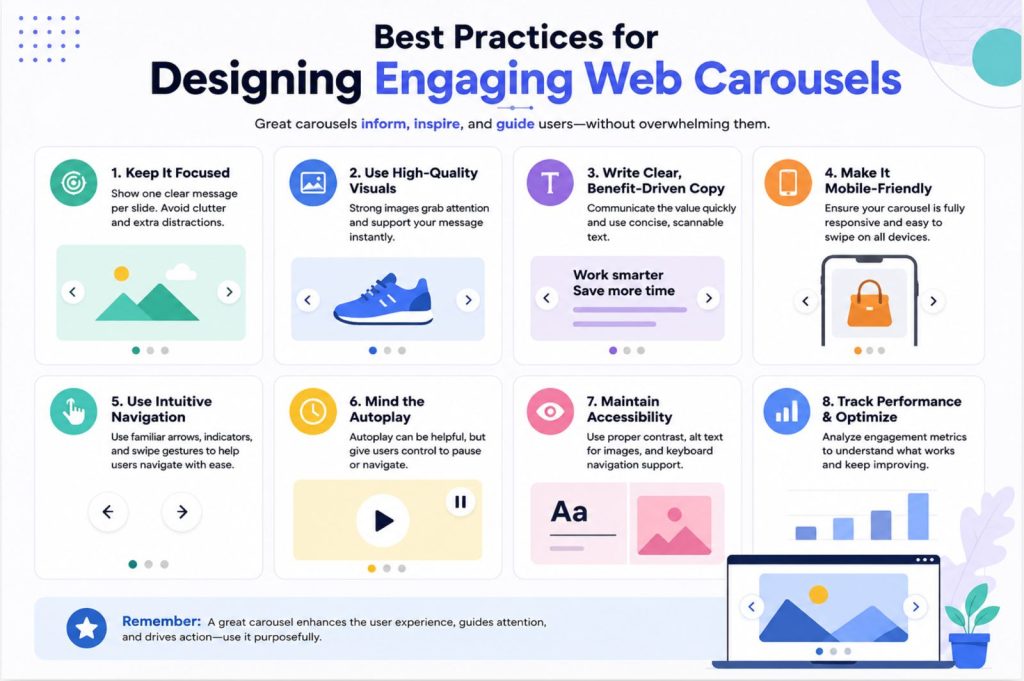
Transforming a simple slider into an effective interactive element requires careful design choices. These central best practices help ensure the carousel draws attention and drives desired actions:
Limit the Number of Slides
User engagement tends to fall after viewing the initial slides. For best results, keep the total slides between three and five and prioritize the most critical content early in the sequence. This helps prevent information overload and maintains user focus on high-impact stories.
Use High-Quality Visuals
High-resolution, relevant images improve credibility and make carousels more enticing. Avoid generic or pixelated graphics, as they can erode trust and cause users to skip slides. Pair visuals with concise, action-oriented text that supports the message.
Provide Clear Navigation Controls
Give users control with distinct navigation, such as arrows or dots, avoiding hidden elements or ambiguous gestures. Enable straightforward navigation at a user’s pace, and consider minimizing or removing autoplay features. Autoplay can distract or annoy visitors, especially if it moves too quickly or unexpectedly. Arrows, swipe gestures, and keyboard support all contribute to usability.
Ensure Responsive Design
Mobile usage continues to grow, so make sure carousels resize elegantly across all devices. Touch-friendly controls and adaptive layouts ensure carousels stay functional and attractive whether viewed on a small phone or a desktop monitor. Responsive design not only benefits users but also supports SEO and accessibility efforts, improving site performance.
Accessibility Considerations
Prioritizing accessibility ensures that all users, regardless of ability, can interact with the content. Focus on the following points:
- All interactive controls (arrows, dots) should be fully keyboard-navigable.
- Each image or visual must include meaningful alternative text, assisting screen readers and users with vision challenges.
- Provide users with options to pause, stop, or hide animated content. Motion and auto-rotating slides pose challenges to those with vestibular disorders or cognitive sensitivities.
For comprehensive accessibility guidelines, refer to resources such as the Web Content Accessibility Guidelines (WCAG)published by the W3C.
Performance Optimization
Well-designed carousels should be lightweight and fast-loading. Slow environments drive up bounce rates and drag down SEO ranking. Take these steps to keep the experience smooth:
- Compress image files while maintaining necessary quality, ideally using modern formats like WebP.
- Minimize use of large scripts or third-party plugins that add unnecessary overhead.
- Implement lazy loading so offscreen images load only as users approach that content, improving perceived speed.
Testing and User Feedback
The most effective carousels are refined over time based on data and direct input. Regularly test your carousel component using A/B or multivariate methods. Monitor metrics such as interaction rates and click-through rates to assess effectiveness. User feedback, gathered through surveys or usability testing, can reveal friction points that analytics alone may not uncover. Testing new arrangements, timings, or messaging ensures the content continues to serve both business and user interests.
Conclusion
Thoughtfully designed web carousels offer dynamic ways to showcase content, drive engagement, and communicate key information within constrained spaces. Following established best practices in design, accessibility, and performance ensures your carousel adds real value rather than distraction. By listening to user feedback and testing systematically, carousels can remain effective components of a modern website strategy. Regularly reviewing analytics such as click-through rates, engagement, and conversions can help identify opportunities for improvement and optimize content placement. Keeping slides concise, visually appealing, and mobile-friendly also enhances the overall user experience across devices. When used strategically, web carousels can highlight featured products, promotions, or important announcements without overwhelming visitors. With continuous refinement and a user-centered approach, they can become a valuable tool for improving navigation, increasing interaction, and supporting your website’s overall marketing and business goals.